
A ZEXELABS PRODUCT

Take Control of
Your WooCommerce Inventory
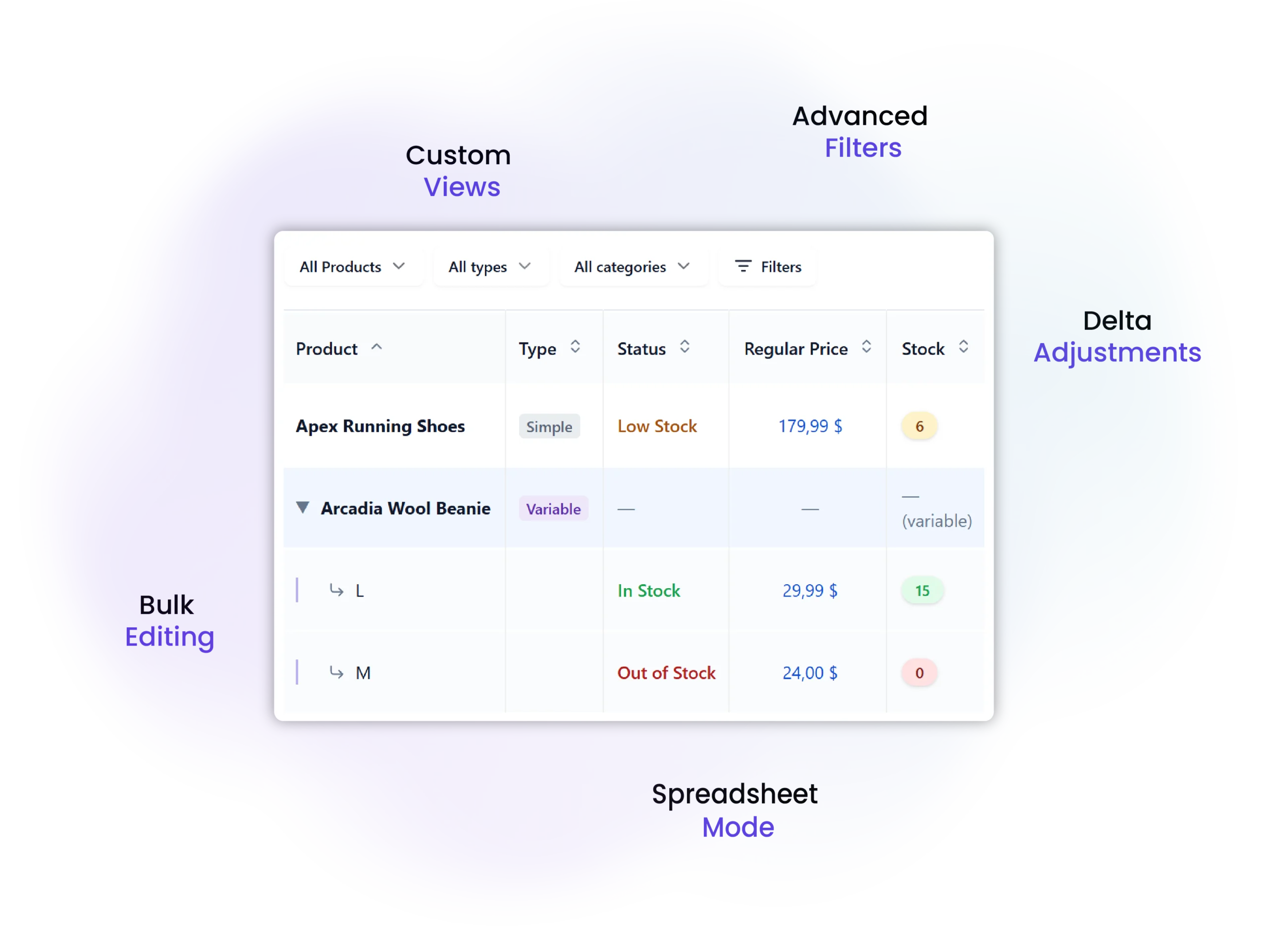
Managing 20 products is easy. Managing 500 isn’t. StockPilot replaces WooCommerce’s default product list with a dedicated inventory workspace built for faster updates, better visibility, and complete control over your stock.

Free forever · No account needed · Upgrade when you’re ready.

WHERE IT BREAKS

WooCommerce helps you sell products. It wasn't built to manage hundreds of them.

As your catalog grows, the default product editor becomes slower to work with. More clicks. More tabs. More repetitive updates. Inventory management starts taking longer than it should, making everyday tasks harder than they need to be.

Updating Inventory Takes Too Long

Changing stock or prices means opening products one by one, waiting for pages to load, saving, then repeating the same process over and over.

Finding the Right Products Becomes a Job

Searching, filtering, and scrolling through a growing catalog slows down even the simplest inventory updates.

Inventory Lives in Too Many Places

Stock changes in WooCommerce. Notes in spreadsheets. Reports somewhere else. The more tools you rely on, the harder it is to stay organized.

WHY STOCKPILOT

One workspace for your entire inventory operation.

Instead of working through endless product pages, StockPilot gives you a fast inventory workspace where everything happens in one place. Search products instantly, update stock and prices inline, manage variations, review changes, export reports, and keep your entire catalog organized without leaving the screen.

WORK THE WAY INVENTORY SHOULD

Everything you need to manage inventory

Every feature in StockPilot is designed around one goal: helping you manage large product catalogs with fewer clicks, fewer mistakes, and less time spent on repetitive work.

Bulk Editing

Stop opening products one by one. Select multiple products and update stock levels, prices, or other inventory values across your catalog in seconds.

Spreadsheet Mode

Edit your inventory in a familiar spreadsheet-style interface, review every change, then save everything together when you’re ready.

Advanced Filters

Quickly build product lists using categories, stock status, suppliers, SKUs, or custom filters so you’re always working on the right products.

Export When You Need It

Generate PDF, CSV, or XLSX exports for reporting, purchasing, or sharing inventory data with your team.

Inventory Dashboard

See low-stock products, inventory trends, and important metrics from one dashboard instead of searching through multiple WooCommerce screens.

Audit Log

See who changed what, when it changed, and restore confidence in your inventory with a complete history of important updates.
BUILT FOR GROWING STORES

Everything you need to manage inventory with confidence.

From faster updates to complete compatibility with modern WooCommerce, StockPilot is designed to simplify inventory management as your store grows.

75%

Faster

0

Calculations

100%

Logged

FREE OR PRO

Start free. Upgrade when your workflow grows.

The Free version replaces WooCommerce’s default inventory workflow. Pro adds advanced tools for stores managing larger catalogs and more frequent inventory updates.

Features

Free

Pro
Inventory Workspace
Search, Sort & Filters
Inline Editing
Variable & Grouped Products
Dashboard & KPIs
PDF Export
CSV & XLSX Export
Bulk Editing
Delta Adjustment Mode
Spreadsheet Mode
Undo Changes
Saved Views
Advanced Filters
Sales Forecasting
Unlimited Audit Log
Priority Support

WHERE TO START

Your catalog has grown. Your inventory tools should too.

Stop managing inventory through endless product pages. Upgrade to a workspace designed specifically for growing WooCommerce stores.

Frequently Asked Questions

Find answers to common questions and get the information you need.

If you’re spending more time managing inventory than fulfilling orders, it’s probably time. Most merchants start feeling the limitations of WooCommerce once they manage a few hundred products or regularly update stock across multiple items.

No. StockPilot works alongside WooCommerce. It replaces the default product list with a dedicated inventory management workspace while keeping your products, orders, and store data exactly where they belong.

Yes. You can manage simple, variable, and grouped products from the same workspace, including individual variations.

Yes. StockPilot includes bulk editing tools, spreadsheet mode, and inline editing so you can update large numbers of products without opening each one individually.

No. StockPilot works directly with your existing WooCommerce product data. There’s nothing to import, migrate, or rebuild.

Yes. StockPilot supports WooCommerce 8+, PHP 8+, and is fully compatible with High-Performance Order Storage (HPOS).

Yes. The free version includes the core inventory workspace, inline editing, dashboards, audit history, PDF exports, and more. Pro adds advanced workflows like spreadsheet mode, bulk editing, forecasting, advanced filters, and unlimited audit history.

Your products, inventory, and WooCommerce data remain untouched. StockPilot enhances how you manage inventory—it doesn’t lock your data into a proprietary system.

A ZEXELABS PRODUCT

Take Control of
Your WooCommerce Inventory

Managing 20 products is easy. Managing 500 isn’t. StockPilot replaces WooCommerce’s default product list with a dedicated inventory workspace built for faster updates, better visibility, and complete control over your stock.

Free forever · No account needed · Upgrade when you’re ready.

WHERE IT BREAKS

WooCommerce helps you sell products. It wasn't built to manage hundreds of them.

As your catalog grows, the default product editor becomes slower to work with. More clicks. More tabs. More repetitive updates. Inventory management starts taking longer than it should, making everyday tasks harder than they need to be.

Updating Inventory Takes Too Long

Changing stock or prices means opening products one by one, waiting for pages to load, saving, then repeating the same process over and over.

Finding the Right Products Becomes a Job

Searching, filtering, and scrolling through a growing catalog slows down even the simplest inventory updates.

Inventory Lives in Too Many Places

Stock changes in WooCommerce. Notes in spreadsheets. Reports somewhere else. The more tools you rely on, the harder it is to stay organized.

WHY STOCKPILOT

One workspace for your entire inventory operation.

Instead of working through endless product pages, StockPilot gives you a fast inventory workspace where everything happens in one place. Search products instantly, update stock and prices inline, manage variations, review changes, export reports, and keep your entire catalog organized without leaving the screen.

WORK THE WAY INVENTORY SHOULD

Everything you need to manage inventory

Every feature in StockPilot is designed around one goal: helping you manage large product catalogs with fewer clicks, fewer mistakes, and less time spent on repetitive work.

Bulk Editing

Stop opening products one by one. Select multiple products and update stock levels, prices, or other inventory values across your catalog in seconds.

Spreadsheet Mode

Edit your inventory in a familiar spreadsheet-style interface, review every change, then save everything together when you’re ready.

Advanced Filters

Quickly build product lists using categories, stock status, suppliers, SKUs, or custom filters so you’re always working on the right products.

Export When You Need It

Generate PDF, CSV, or XLSX exports for reporting, purchasing, or sharing inventory data with your team.

Inventory Dashboard

See low-stock products, inventory trends, and important metrics from one dashboard instead of searching through multiple WooCommerce screens.

Audit Log

See who changed what, when it changed, and restore confidence in your inventory with a complete history of important updates.

BUILT FOR GROWING STORES

Everything you need to manage inventory with confidence.

From faster updates to complete compatibility with modern WooCommerce, StockPilot is designed to simplify inventory management as your store grows.

75%

Faster

0

Calculations

100%

Logged

FREE OR PRO

Start free. Upgrade when your workflow grows.

The Free version replaces WooCommerce’s default inventory workflow. Pro adds advanced tools for stores managing larger catalogs and more frequent inventory updates.

Features

Free

Pro
Inventory Workspace
Search, Sort & Filters
Inline Editing

Variable & Grouped Products

Dashboard & KPIs
PDF Export
CSV & XLSX Export
Bulk Editing
Delta Adjustment Mode
Spreadsheet Mode
Undo Changes
Saved Views
Advanced Filters
Sales Forecasting
Unlimited Audit Log
Priority Support

WHERE TO START

Your catalog has grown. Your inventory tools should too.

Stop managing inventory through endless product pages. Upgrade to a workspace designed specifically for growing WooCommerce stores.

Frequently Asked Questions

Find answers to common questions and get the information you need.

If you’re spending more time managing inventory than fulfilling orders, it’s probably time. Most merchants start feeling the limitations of WooCommerce once they manage a few hundred products or regularly update stock across multiple items.

No. StockPilot works alongside WooCommerce. It replaces the default product list with a dedicated inventory management workspace while keeping your products, orders, and store data exactly where they belong.

Yes. You can manage simple, variable, and grouped products from the same workspace, including individual variations.

Yes. StockPilot includes bulk editing tools, spreadsheet mode, and inline editing so you can update large numbers of products without opening each one individually.

No. StockPilot works directly with your existing WooCommerce product data. There’s nothing to import, migrate, or rebuild.

Yes. StockPilot supports WooCommerce 8+, PHP 8+, and is fully compatible with High-Performance Order Storage (HPOS).

Yes. The free version includes the core inventory workspace, inline editing, dashboards, audit history, PDF exports, and more. Pro adds advanced workflows like spreadsheet mode, bulk editing, forecasting, advanced filters, and unlimited audit history.

Your products, inventory, and WooCommerce data remain untouched. StockPilot enhances how you manage inventory—it doesn’t lock your data into a proprietary system.

A ZEXELABS PRODUCT

Take Control of
Your WooCommerce Inventory

Managing 20 products is easy. Managing 500 isn’t. StockPilot replaces WooCommerce’s default product list with a dedicated inventory workspace built for faster updates, better visibility, and complete control over your stock.
Free forever · No account needed · Upgrade when you’re ready
WHERE IT BREAKS

WooCommerce helps you sell products. It wasn't built to manage hundreds of them.

As your catalog grows, the default product editor becomes slower to work with. More clicks. More tabs. More repetitive updates. Inventory management starts taking longer than it should, making everyday tasks harder than they need to be.

Updating Inventory Takes Too Long

Changing stock or prices means opening products one by one, waiting for pages to load, saving, then repeating the same process over and over.

Finding the Right Products Becomes a Job

Searching, filtering, and scrolling through a growing catalog slows down even the simplest inventory updates.

Inventory Lives in Too Many Places

Stock changes in WooCommerce. Notes in spreadsheets. Reports somewhere else. The more tools you rely on, the harder it is to stay organized.

WHY STOCKPILOT

One workspace for your entire inventory operation.

Instead of working through endless product pages, StockPilot gives you a fast inventory workspace where everything happens in one place. Search products instantly, update stock and prices inline, manage variations, review changes, export reports, and keep your entire catalog organized without leaving the screen.

WORK THE WAY INVENTORY SHOULD

Everything you need to manage inventory

Every feature in StockPilot is designed around one goal: helping you manage large product catalogs with fewer clicks, fewer mistakes, and less time spent on repetitive work.

Bulk Editing

Stop opening products one by one. Select multiple products and update stock levels, prices, or other inventory values across your catalog in seconds.

Spreadsheet Mode

Edit your inventory in a familiar spreadsheet-style interface, review every change, then save everything together when you’re ready.

Advanced Filters

Quickly build product lists using categories, stock status, suppliers, SKUs, or custom filters so you’re always working on the right products.

Export When You Need It

Generate PDF, CSV, or XLSX exports for reporting, purchasing, or sharing inventory data with your team.

Inventory Dashboard

See low-stock products, inventory trends, and important metrics from one dashboard instead of searching through multiple WooCommerce screens.

Audit Log

See who changed what, when it changed, and restore confidence in your inventory with a complete history of important updates.

BUILT FOR GROWING STORES

Everything you need to manage inventory with confidence.

From faster updates to complete compatibility with modern WooCommerce, StockPilot is designed to simplify inventory management as your store grows.

75%

Faster

0

Calculations

100%

Logged

FREE OR PRO

Start free. Upgrade when your workflow grows.

The Free version replaces WooCommerce’s default inventory workflow. Pro adds advanced tools for stores managing larger catalogs and more frequent inventory updates.

Features

Free

Pro

Inventory Workspace

Search, Sort & Filters
Inline Editing

Variable & Grouped Products

Dashboard & KPIs
PDF Export
CSV & XLSX Export
Bulk Editing
Delta Adjustment Mode
Spreadsheet Mode
Undo Changes
Saved Views
Advanced Filters
Sales Forecasting
Unlimited Audit Log
Priority Support

WHERE TO START

Your catalog has grown. Your inventory tools should too.

Stop managing inventory through endless product pages. Upgrade to a workspace designed specifically for growing WooCommerce stores.

Frequently Asked Questions

Find answers to common questions and get the information you need.

If you’re spending more time managing inventory than fulfilling orders, it’s probably time. Most merchants start feeling the limitations of WooCommerce once they manage a few hundred products or regularly update stock across multiple items.

No. StockPilot works alongside WooCommerce. It replaces the default product list with a dedicated inventory management workspace while keeping your products, orders, and store data exactly where they belong.

Yes. You can manage simple, variable, and grouped products from the same workspace, including individual variations.

Yes. StockPilot includes bulk editing tools, spreadsheet mode, and inline editing so you can update large numbers of products without opening each one individually.

No. StockPilot works directly with your existing WooCommerce product data. There’s nothing to import, migrate, or rebuild.

Yes. StockPilot supports WooCommerce 8+, PHP 8+, and is fully compatible with High-Performance Order Storage (HPOS).

Yes. The free version includes the core inventory workspace, inline editing, dashboards, audit history, PDF exports, and more. Pro adds advanced workflows like spreadsheet mode, bulk editing, forecasting, advanced filters, and unlimited audit history.

Your products, inventory, and WooCommerce data remain untouched. StockPilot enhances how you manage inventory—it doesn’t lock your data into a proprietary system.